Install Witzo on WordPress
Add the Witzo widget to WordPress using a site-wide footer method, then verify that the chat works correctly on the live site.
Overview
Witzo installs on WordPress by adding your widget script to a global location. The safest approach is to use a header/footer plugin so the script remains in place when the theme is updated.
Recommended Method: Use a Header/Footer Plugin
Using a plugin such as WPCode or Insert Headers and Footers is safer than editing theme files directly, because theme updates can overwrite manual changes to footer.php.
- Install a header/footer plugin such as WPCode.
- Open Settings > Header & Footer.
- Paste the Witzo embed script into the Footer Scripts section.
- Save changes.
Manual Theme Method
Use this method only if your workflow requires direct theme editing.
- Copy your embed script from the dashboard.
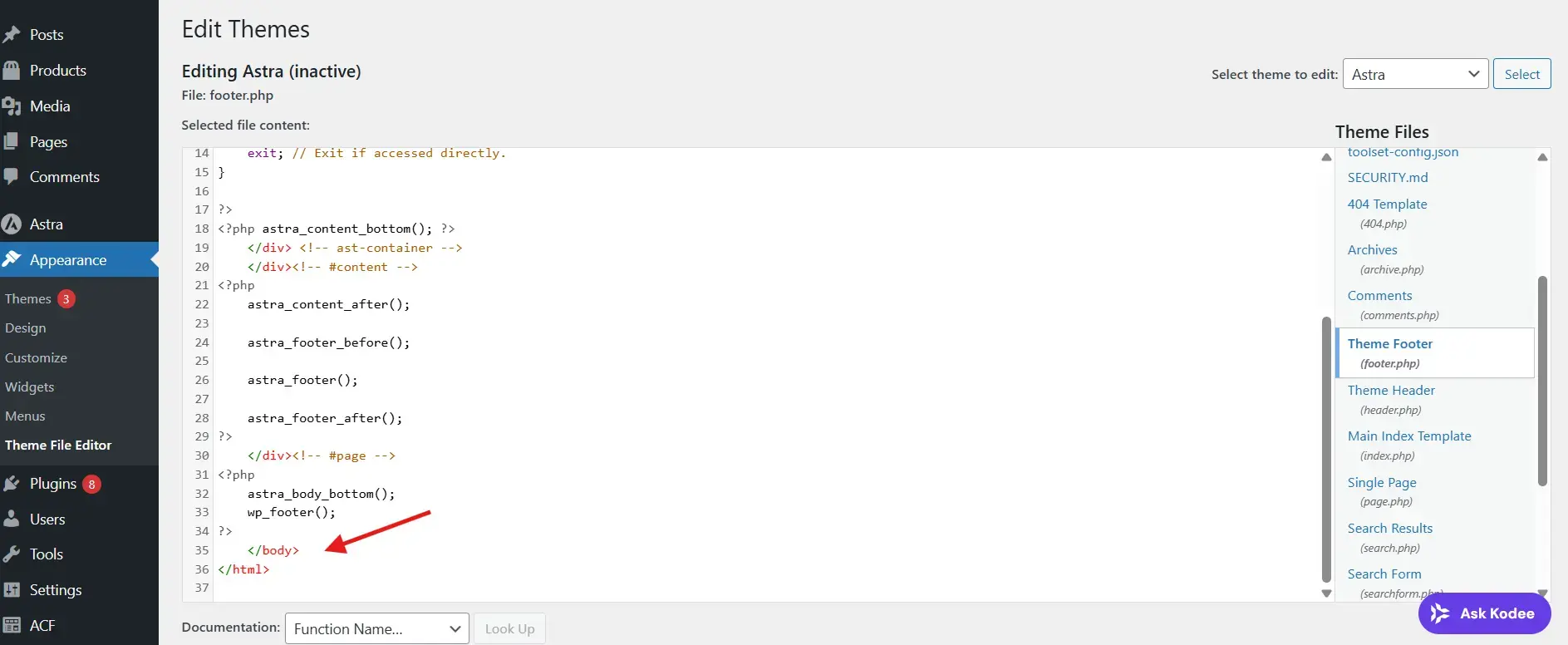
- Open Appearance > Theme File Editor > footer.php.
- Paste the script before the closing
</body>tag. - Save the file.
Clear Cache
- Clear your WordPress cache plugin such as WP Rocket, LiteSpeed, or W3 Total Cache.
- Clear server cache if hosted on managed hosting.
- Clear CDN cache if you use Cloudflare or another provider.
- Hard refresh your browser with
Ctrl + Shift + R.
Testing Checklist
- Widget appears on your website
- No console errors appear in browser DevTools
- You can open the widget and send a test message
- AI responds correctly
- Conversations appear in Dashboard > Conversations
- Usage updates in Dashboard > Analytics
Important Notes
- Always use the correct widget key.
- Add the script globally for site-wide coverage.
- Direct edits to
footer.phpcan be lost when the theme is updated. - If you use page builders such as Elementor, avoid adding the script inside individual pages.